
Coaches and small businesses
Take the post-sale admin off your plate
After a sale closes, someone still chases the contract, the payment plan, community access and the renewal by hand. We build the first version of that workflow, then teach you how to expand it. A person still approves anything that goes out.
- Coaching businesses
- Construction, HVAC and other trades
- Small firms that run on spreadsheets
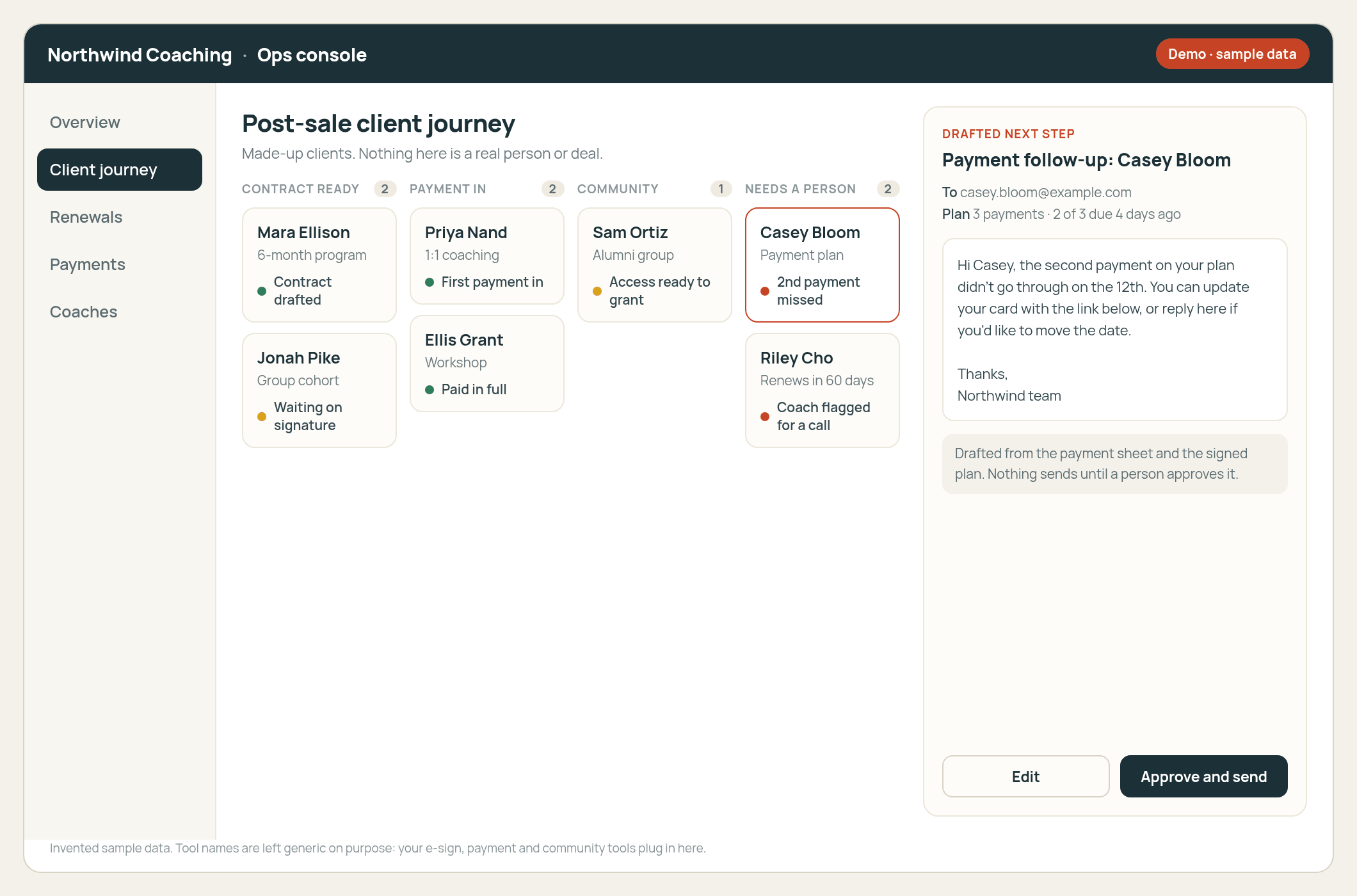
Pulls the steps you already run after a sale out of your sheets and your e-sign, payment and community tools.
Drafts the next action for a person to approve. In the first version, nothing sends or tags a client by itself.
You keep the setup, and we train you to build on it, so you are not renting a black box.
Where it starts
Sheets, e-sign and a chase after every sale
At one coaching business we talked to, an admin coordinator handled invoices, payment-plan follow-ups, custom contracts and community onboarding by hand, and it got harder to keep up as the client list grew. Small firms that renew or onboard out of a spreadsheet run into the same thing.
Before
Manual- Contract out of a templateCustom terms get written, sent and tracked by one person.
- Payment plans on a sheetMissed payments get chased when someone remembers to look.
- Community access by handTags, welcome posts and access to the right spaces get clicked in one at a time.
- Renewals and upsells lateThe next conversation waits until someone digs through the sheet.
After
Draft · approve- Journey boardContract ready, payment in, community access, needs a person.
- Drafted next stepThe follow-up, tag or renewal note is written for you to read.
- You still hit sendExceptions and anything a client sees wait for a person.
- You can keep buildingWe leave the setup and the training, so the next workflow is yours to build.
Based on real coaching and small-business calls. Client names are left out.
What we build
One painful handoff first, then you take it further
For coaches and small businesses we do two things. We build a starting setup for the job that eats the most hours, and we teach you how to expand it for your own business. The goal is a setup your team can run and add to.
- Pick the one jobUsually the client journey after the sale, renewals, or getting data out of the inbox and into a record.
- Ship the starting setupA console or workflow that drafts the next step from the tools you already use. We show it to you on made-up data first.
- Train your team to expand itWorking sessions so your team can add the next rule without waiting on us for every change.
Patterns we've seen
The same problem in coaching and other small firms
-
Coaching admin after the sale
Invoices, payment plans, e-sign contracts and community onboarding all ran through one coordinator and a stack of sheets. A first build watches that journey and drafts the next step for the coordinator to approve.
-
Reseller renewals out of a sheet
A software reseller kept renewals in a spreadsheet and monthly folders, then typed the same deal into the CRM and accounting. We built a console that drafts the quote and the email, and a person still hits send. See the renewal quotes page.
-
Tools your clients use
Some coaches also want something clients use directly, like an assessment that leads into a coaching offer or an app for tracking progress between sessions. Scott built a progress-tracking app for his own coaching business, so bring it up on the call if that is what you need.
Questions
Common questions
Is this only for coaches?
No. Coaching is where we start because we know that work, and the post-sale admin problem is easy to see there. The same build-and-teach approach fits other small businesses with a messy handoff, like construction and HVAC companies.
Will it message my clients without me?
No. The first version drafts the next step. A person reads it, approves it and sends it from their own account. Community tags and similar actions can wait for the same approval.
Do I have to replace the tools I already use?
No. The starting setup reads the sheets and the e-sign, payment and community tools you already use. Which connectors we use depends on your stack.
Is this a big custom build or a short engagement?
We start with one scoped job and the training around it. If the job is bigger, we can take on a company-wide build. We talk price on a call once we know what the job is.
Where does it run?
In your own accounts and tools. We can walk you through a demo on made-up data first.
How do we start?
Use the contact page to book a 30-minute call with Scott, or email scott@tenfoldlabs.io. Tell us what happens after a sale today.
Talk to us about coaching ops
If your post-sale admin still runs through a sheet and one person's memory, tell us how it works today. We'll tell you whether a starting setup makes sense.
You work directly with Scott Hanson, who scopes the first version with your team and builds it. Based in Austin.
Or email scott@tenfoldlabs.io