
For teams that retype email
Extract data from emails into Excel, QuickBooks or your CRM
Vendor emails and attachments are read into rows, checked by a person, and saved to the spreadsheet, CRM or QuickBooks you already run. Your vendors keep sending email the way they do now.
- License keys from fulfillment emails
- Partner files sent as attachments
- Long PDF bills
- Call notes for the CRM
Before and after
One emailed order, two ways
A software reseller walked us through this on a call. The same details had to land in three places.
How it worked by hand
Triple entry- 50 keys on an ordermeans 50 vendor emails
- Copy each keyinto the order spreadsheet
- Type the customer againin the CRM
- And again for the invoicein QuickBooks
With the order console
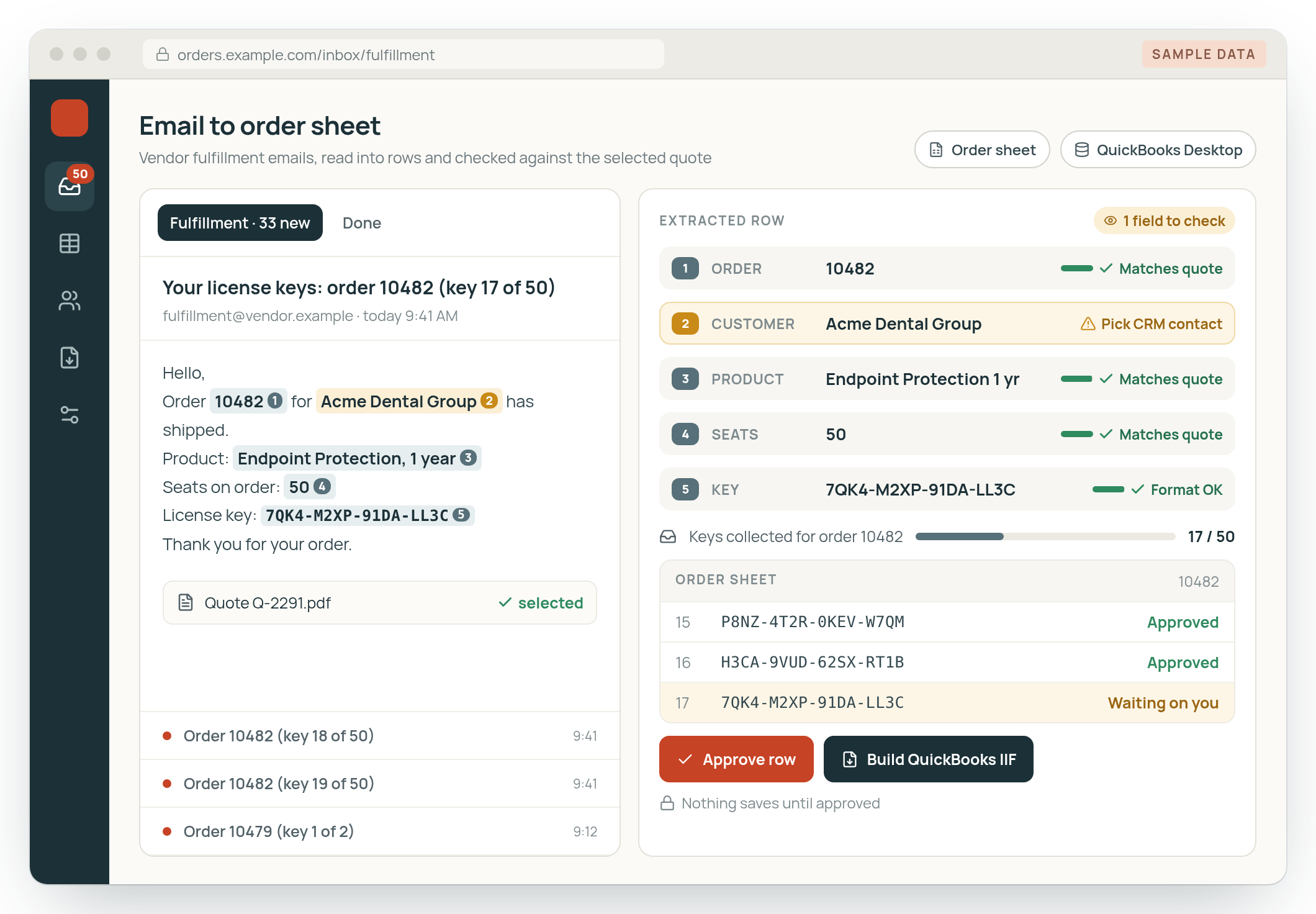
Built- Each email becomes a rowread from the vendor's message
- Checked against the quotethe PDF the person selected
- A person approvesnothing saves before that
- QuickBooks import builtan IIF with the customer and first invoice
From our calls
If we place an order that has 50 keys, we get 50 emails, and I have to drag 50 keys into it.
The double entry, triple entry, it's terrible.

Photo: Andrew Neel on Unsplash.
Who this is for
Teams that copy data out of email by hand. Someone reads each message and types the same details into a spreadsheet, then often into a second system.
A lot of the information still comes in by email, as one master distributor told us.
Where the data lives
- Order spreadsheets
- QuickBooks Desktop
- Your CRM
- PDF attachments
How extracting data from emails works
Three steps, your systems
Your systems change the details. The order stays the same.
- 01
Read the emails where they land
A shared inbox or a forwarding rule passes messages along. The system pulls customer, product, key, quantity, date or amount into a table.
- 02
Check, then a person approves
Rows are checked against the quote or document they belong to. Someone on your team approves or edits every batch.
- 03
Save to your system
Approved rows go into the spreadsheet, CRM or accounting system you run, such as an IIF file for QuickBooks Desktop.
Built by Tenfold
A software reseller's vendor emails, read into an order console
- Before, license keys were copied from vendor fulfillment emails into an order spreadsheet, then the same customer was typed again in QuickBooks Desktop.
- The console reads those vendor emails into structured rows for the order sheet.
- It builds an IIF file that creates the customer and the first invoice in QuickBooks Desktop.
- The IIF is built from the quote PDF the person selected, so a mismatched quote can't slip through without anyone noticing.
- A person approves the result before anything is saved.
How often email data extraction comes up
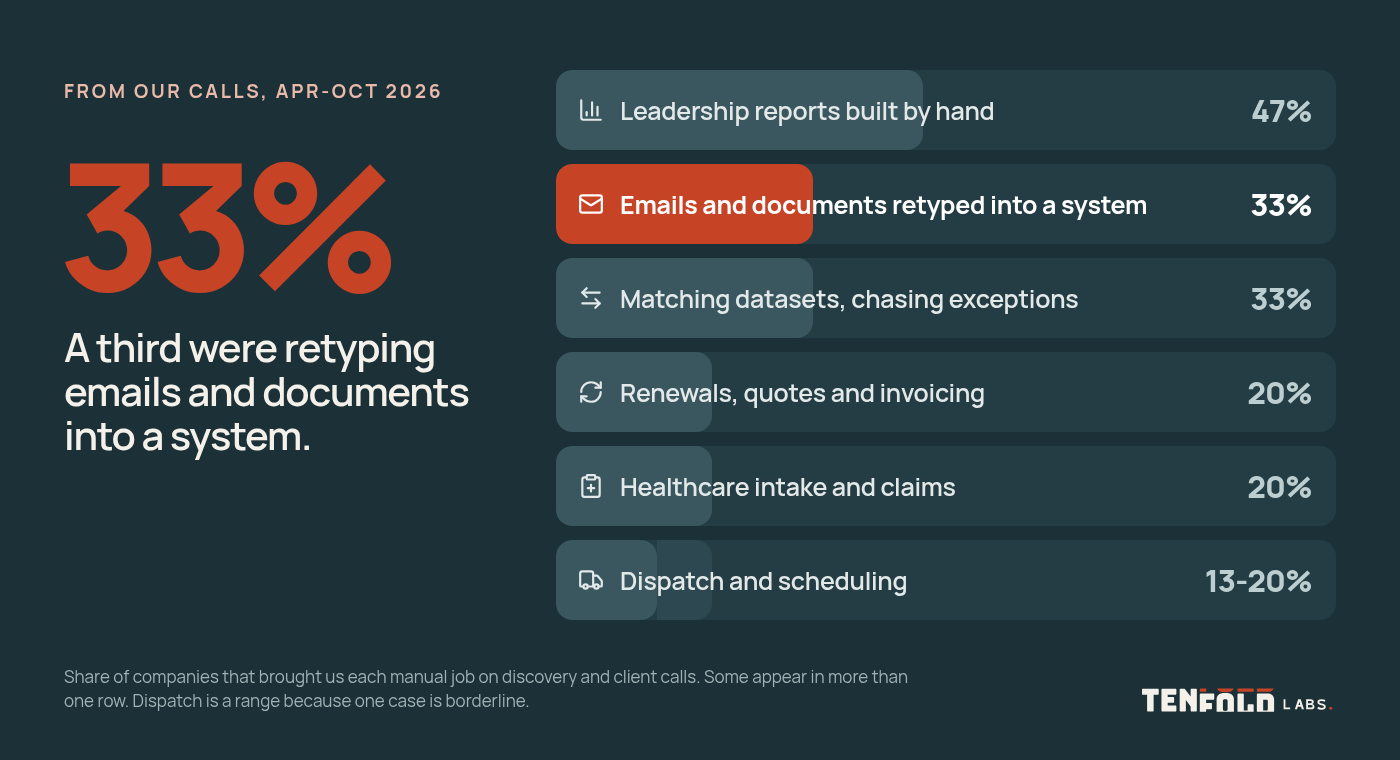
33% of companies on our calls
About a third of the companies on our calls described retyping emails and documents into a system.
Getting started
What a first version takes
What to bring
- A batch of recent emails, messy ones included
- The spreadsheet or system they end up in
- The person who does the typing now
What you see first
You see a working prototype on those messages before a full build. The people who retype today decide what gets checked.
Questions
Common questions
Watch the 32-second version
32 seconds. Narration is a synthetic voice. Screens are samples, not client data.
Do our vendors have to change how they send things?
No. The console reads the emails as they arrive today. If a vendor changes its format, the reading is adjusted.
Does it work with QuickBooks Desktop?
Yes. In the build on this page, the console produces an IIF file that QuickBooks Desktop imports to create the customer and the first invoice.
What if it reads something wrong?
A person checks every batch before it is saved, so a wrong row gets fixed in review. For long documents where every line matters, checks against totals in the document can flag a miscount.
Can it read attachments and PDFs?
Yes, though quality varies. One team we spoke with got 90 to 95 percent accuracy on 300-page, low-quality PDF bills with its own scripts and needed 100 percent, so a person stays on every batch.
How is this different from the order entry page?
AI order entry covers customers' purchase orders going into an ERP. This page covers vendor emails, partner files and other data people retype.
How do we start?
Use the contact page or email scott@tenfoldlabs.io. Send a few examples and tell us which system they go into.
Send us a few of the emails your team retypes
Send a few examples and tell us where they end up. We'll tell you whether a prototype on your own messages makes sense.
You work directly with Scott Hanson, who scopes the first version with your team and builds it. Based in Austin.
Or email scott@tenfoldlabs.io